

In the rapidly evolving world of software development, engineering a flawless machine learning model is only half the battle. If the user interface (UI) surrounding that model is clunky, confusing, or feels slow, your users will abandon the application within seconds.
Designing an Artificial Intelligence application requires a complete paradigm shift in User Experience (UX) methodology. Traditional mobile and web applications are deterministic and instantaneous. A user clicks a button, a database is queried, and the screen updates in less than 50 milliseconds.
AI applications, however, are probabilistic and computationally heavy. Generating a high-resolution image, parsing a 50-page legal document, or generating a conversational response takes time—often several seconds. Furthermore, the AI will occasionally make mistakes (hallucinate). If your UX does not gracefully mask this latency and provide users with intuitive ways to correct the AI’s errors, your product will fail.
In this deep-dive design guide, we will explore the specific frontend engineering and UX/UI patterns required to build world-class AI products. Understanding this design language is a mandatory phase in the AI application development lifecycle.
If your startup needs a product that feels magical rather than mechanical, MindRind provides elite generative ai app development services, blending robust backend machine learning with stunning, zero-friction frontend designs.
Chapter 1: The Psychology of AI Latency
The most critical challenge a UX designer faces in generative AI application development is the “Wait Time.”
Human psychology dictates that if a digital interface does not respond within 1 to 2 seconds, the user assumes the app has crashed or their internet connection has failed. Because Cloud APIs and complex neural networks often take 3 to 10 seconds to generate an output, front-end developers must utilize psychological tricks to bridge this gap. This process is known as Latency Masking.
Skeleton Screens and Shimmer Effects
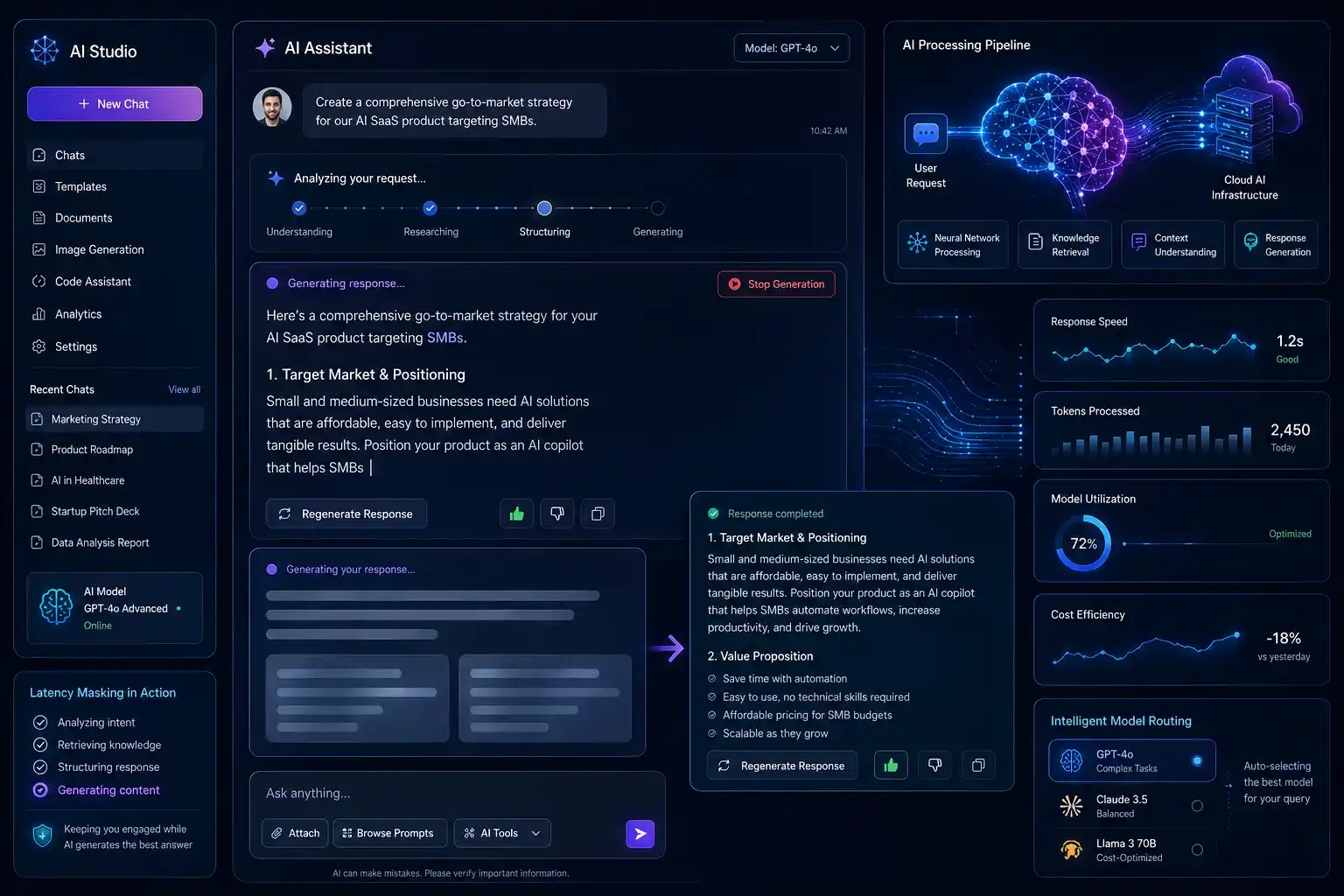
Never use a static loading spinner (the traditional spinning wheel). A spinning wheel creates anxiety; it tells the user, “You are stuck.” Instead, use Skeleton Screens. A skeleton screen displays a wireframe version of the final UI (e.g., grey boxes where text and images will eventually appear) with a subtle, animated “shimmer” effect moving across it. This gives the psychological illusion of progress and makes the wait time feel 30% faster than a static spinner.
Micro-Interactions and “Working” States
If the AI task takes longer than 5 seconds (such as generating a video or analyzing a massive dataset), the UI must communicate what the AI is doing.
- Instead of a blank screen, display dynamic text updates: “Analyzing document structure…” ➔ “Extracting key entities…” ➔ “Formatting response…”
- This transforms the wait time from a frustrating delay into a display of the AI’s complex “thinking” process, actually increasing the user’s perceived value of the product.
To understand the backend reasons behind why this latency exists in the first place, designers should review the structural differences between traditional vs AI-powered app development.
Chapter 2: Streaming Outputs (The ChatGPT Effect)
If your app uses Large Language Models (LLMs) to generate text, you must never wait for the backend to generate the entire paragraph before displaying it on the screen.
Server-Sent Events (SSE) and WebSockets
Modern AI UI design mandates the use of streaming text. Backend engineers must configure the API Gateway to utilize Server-Sent Events (SSE) or WebSockets.
- The Workflow: As the LLM generates the response token-by-token (word-by-word) on the cloud server, those tokens are instantly pushed to the mobile or web frontend.
- The UX Win: The user sees the first word appear on their screen in under 500 milliseconds. Even if the entire paragraph takes 8 seconds to finish generating, the user is already engaged in reading the first sentence. The perceived latency drops to zero.
Designing the “Stop Generation” Button
Because generative text streams in real-time, the user may realize within the first two seconds that the AI misunderstood the prompt. A crucial UI element is the “Stop Generation” button. Allowing the user to halt the AI prevents them from waiting for an irrelevant answer and saves your company significant API token costs by terminating the cloud process early.
If you are struggling to balance these API costs with a free user tier, your product team must carefully design UI upgrade prompts to effectively monetize your AI app solutions.
Chapter 3: Designing for “Human-in-the-Loop” (HITL)
No machine learning model is 100% perfect. Generative AI will occasionally hallucinate facts, and Computer Vision models might misidentify an object. If your UI treats the AI’s output as an indisputable fact, users will lose trust the moment an error occurs.
Great AI UX design embraces uncertainty. It positions the AI as an “Assistant,” not an “Oracle.” This is achieved through Human-in-the-Loop (HITL) design patterns.
Granular Editability
When the AI generates a complex output—such as drafting an email or generating a workout routine in an AI fitness app , the user must be able to edit the output seamlessly. Do not trap the AI’s response in a static chat bubble. The response should be rendered in an editable text field or a modular card interface, allowing the user to tweak the workout reps or change a sentence before finalizing the action.
Micro-Feedback Loops (Implicit vs. Explicit)
To improve your machine learning models over time (via MLOps), your app needs data on whether the AI’s output was helpful. The UI must collect this data without annoying the user.
- Explicit Feedback: Simple, frictionless UI elements like a “Thumbs Up / Thumbs Down” icon, a “Regenerate” button, or a “Report Inaccuracy” flag placed directly beneath the AI’s response.
- Implicit Feedback: The UI tracks user behavior. If the AI generates a block of code and the user immediately copies it to their clipboard, the backend registers this as a “success.” If the user deletes the text and types a new prompt, it registers as a “failure.” This data is fed back into the model for continuous fine-tuning.
Chapter 4: The Conversational Interface vs. GUI
The massive success of ChatGPT has convinced many founders that every AI app needs a conversational chat interface. This is a severe UX anti-pattern.
While chat interfaces are great for open-ended exploration, they are terrible for specific, repetitive workflows. Typing out a full sentence is much slower than clicking a button.
Augmenting the Graphical User Interface (GUI)
Instead of forcing the user to chat with a bot, integrate AI invisibly into the traditional GUI.
- Action Buttons: If a user is viewing a long PDF in your app, do not make them type “Please summarize this document.” Provide a sticky UI button that says “✨ Summarize”. One click triggers the prompt in the backend.
- Predictive Prompts (Chips): When a user does open a chat interface, provide them with “Prompt Chips” (clickable suggested questions) right above the keyboard. This removes the cognitive load of having to figure out how to talk to the AI.
For enterprise clients, clunky chat interfaces are unacceptable. They require deeply integrated workflows. This is why many corporations avoid generic off-the-shelf software and instead invest heavily in custom AI application development to ensure the AI feels like a native part of their internal dashboards.
Chapter 5: Designing for Edge AI and Offline States
When your engineering team decides to process AI locally on the user’s phone (Edge AI) rather than in the cloud, the UX designer faces a new set of challenges.
Edge AI (like Apple’s CoreML) is incredibly fast and works offline, but the machine learning models themselves can be massive (500MB to 1GB). You cannot force a user to download a 1GB file over cellular data the moment they open the app.
Asynchronous Model Downloading
The UI must elegantly handle the “Model Download” state.
- When the user downloads the app from the App Store, it should be lightweight.
- When they attempt to use an AI feature for the first time, the UI should display a beautifully designed prompt: “To ensure your privacy and lightning-fast speeds, we need to download the AI Engine (300MB). Wi-Fi recommended.”
- The download must happen asynchronously in the background, allowing the user to explore the rest of the app while the model installs.
Managing this complex interplay between mobile frontend design, model quantization, and backend infrastructure is why tech startups rely heavily on specialized partners. If your design team is struggling to merge aesthetics with machine learning constraints, understanding the workflow of an artificial intelligence app development agency will clarify how designers and ML engineers collaborate during agile sprints.
Craft Seamless AI Experiences with MindRind
A powerful neural network is useless if it is trapped behind a frustrating, lagging user interface. Building a successful AI application requires an engineering team that understands both complex vector mathematics and human psychology.
At MindRind, our core focus is generative ai application development that feels like magic. We do not just train models; our specialized UI/UX designers and frontend developers craft custom interfaces that mask latency, handle probabilistic errors gracefully, and guide users effortlessly through complex AI workflows.
Don’t let poor design ruin your AI product. Contact MindRind today to architect an intuitive, lightning-fast AI application.
Frequently Asked Questions
Traditional apps are deterministic and instant. AI apps are probabilistic (they can make mistakes) and take time to generate outputs (latency). AI UX design must focus on latency masking, streaming data, and providing users with tools to edit or regenerate the AI’s output gracefully.
Latency masking is a psychological UX technique used to hide the time it takes for a cloud AI model to process data. Instead of using a boring, static loading spinner, designers use Skeleton Screens, glowing animations, or dynamic text updates (e.g., “Analyzing image…”) to make the wait time feel shorter and more engaging.
Streaming text (using Server-Sent Events or WebSockets) is crucial for perceived performance. Large Language Models (LLMs) can take several seconds to generate a full paragraph. By streaming the text token-by-token as it is generated, the user can start reading immediately, effectively reducing the perceived wait time to zero.
HITL is a design philosophy acknowledging that AI is not perfect. It involves designing interfaces that allow the user to intervene. For example, if an AI drafts an email, the UI should place the text in an editable box so the human can review, edit, and approve it before it is sent.
No. While conversational chat interfaces are great for exploration, they are slow for repetitive tasks because they require the user to type. Good AI UX integrates AI directly into the Graphical User Interface (GUI) via one-click “Action Buttons” (e.g., “Summarize this page”) to reduce cognitive load.
A skeleton screen is a wireframe placeholder that outlines where text, images, and buttons will appear once the AI finishes generating the content. It usually features a subtle shimmering animation. It is the modern standard for replacing traditional spinning loading wheels.
Edge AI models run locally on the phone and can be very large (hundreds of megabytes). Designers must create clear, polite UI prompts that ask the user to download the model over Wi-Fi, while allowing the download to happen in the background so the user can continue exploring the app.
Feedback loops (like thumbs up/down buttons or “Regenerate” options) are essential for MLOps. The data collected from these micro-interactions is sent back to the engineering team. It allows data scientists to understand where the AI is failing and fine-tune the models to improve future accuracy.