

For the past decade, building a successful mobile or web application followed a highly predictable, standardized blueprint. Your engineering team would gather requirements, design a relational database, write business logic in a backend framework like Node.js or Ruby on Rails, and connect it to a frontend built in React Native or Swift.
If the code was written correctly, the app worked flawlessly.
However, the transition to ai powered app development fundamentally destroys this predictable blueprint. Integrating Artificial Intelligence is not simply a matter of adding a new API endpoint to your existing microservices. It represents a paradigm shift in how software processes information, handles errors, and interacts with users.
For Chief Technology Officers (CTOs) and Engineering Managers, guiding a team through this transition is an immense challenge. You are no longer just managing software developers; you must now orchestrate data scientists, MLOps engineers, and specialized UI designers.
In this comprehensive architectural breakdown, we will explore the core differences between standard applications and AI-driven systems. Understanding these engineering shifts is the first critical step in mastering the complete AI application development lifecycle.
If your internal team lacks the specialized machine learning expertise required to make this leap, partnering with an elite agency for custom ai app development solutions can instantly modernize your product offering without disrupting your current sprint cycles.
Chapter 1: Deterministic vs. Probabilistic Logic
The most profound difference between traditional software and AI software lies at the very foundation of computer science: the nature of logic itself.
Traditional Apps: The Deterministic Engine
Standard applications operate on Deterministic Logic (Heuristics). The software executes strict If-Then-Else statements.
- Example: If a user enters the correct password, grant access. If the user clicks “Checkout,” deduct funds from their wallet.
- In a traditional app, an input of A will always result in an output of B, 100% of the time. The software does exactly what the programmer explicitly commanded it to do. Bugs are simply logical errors made by the human coder.
AI Apps: The Probabilistic Engine
AI applications operate on Probabilistic Logic. You do not write step-by-step instructions for the AI to follow. Instead, you feed the AI data, and it uses complex mathematics (neural networks) to predict the most likely outcome.
- Example: If a user uploads a photo of a receipt, the AI does not have a hard-coded rule for where the “Total Amount” is located. Instead, it calculates a statistical probability (e.g., “I am 94% confident that this pixel cluster represents $45.00”).
- In an AI app, the same input might yield a slightly different output tomorrow if the underlying model has been updated.
This shift forces the engineering team to change how they write code. Backend developers must write “fallback logic.” What should the application do if the AI model returns a confidence score of only 65%? The app architecture must gracefully handle uncertainty, asking the user for manual confirmation rather than blindly executing a command.
Chapter 2: The Radical Shift in Backend Architecture
When building a traditional application, backend architecture is relatively straightforward. You provision a server on AWS, set up a PostgreSQL database, and build a REST or GraphQL API to serve JSON payloads to the mobile app.
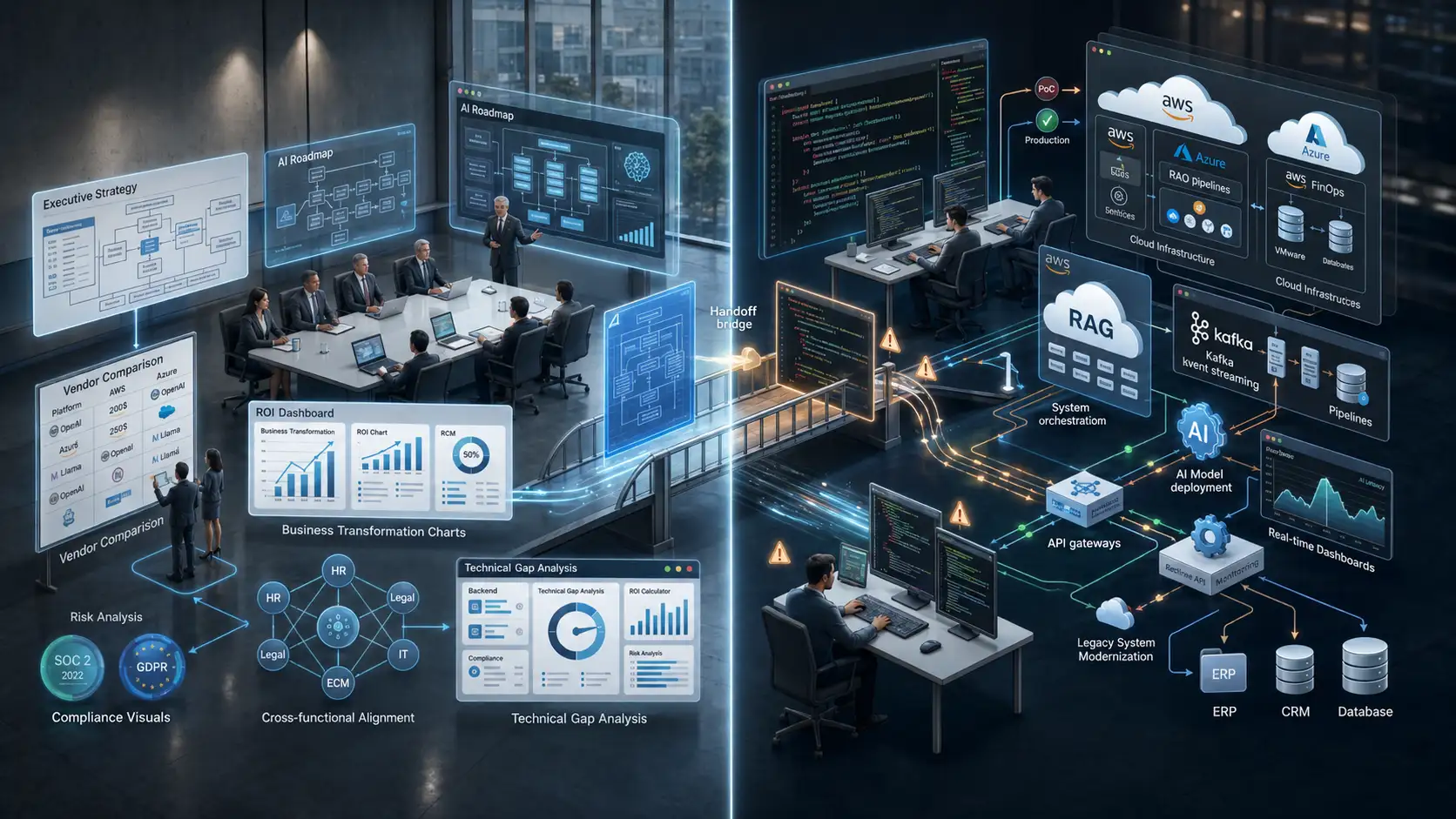
In smart app development, the backend becomes a complex, multi-layered beast. You must introduce entirely new infrastructure components that most traditional backend developers have never worked with.
The Data Pipeline (ETL)
In traditional dev, users generate the data (filling out forms, clicking buttons). In AI dev, the system consumes massive amounts of raw, unstructured data to make decisions. Your team must build Extract, Transform, Load (ETL) pipelines to constantly clean, sanitize, and format data before it ever reaches the AI model.
Inference Servers vs Web Servers
A traditional web server is optimized to handle thousands of tiny, lightweight HTTP requests per second. An AI Inference Server (where the machine learning model actually lives) is the exact opposite.
- Running a machine learning model requires intense computational power, specifically GPUs (Graphics Processing Units).
- If your app uses a custom model for image recognition or natural language processing, you cannot host it on a standard AWS EC2 instance. You must deploy specialized inference containers (using tools like Docker and NVIDIA Triton) that can efficiently route user requests to the GPUs.
Vector Databases
If you are integrating Large Language Models (LLMs) into your mobile app, traditional SQL databases are insufficient. Your engineering team must learn to architect and query Vector Databases (like Pinecone or Milvus), which store data as complex mathematical arrays (embeddings) to enable semantic search capabilities.
Chapter 3: Frontend Evolution and Latency Masking
The transition to AI doesn’t just disrupt the backend; it fundamentally changes frontend mobile app development and UI engineering.
In traditional apps, users expect instant gratification. When a user clicks a button to fetch their profile data, the backend queries the SQL database and returns the data in under 50 milliseconds. The UI feels snappy and instantaneous.
The Latency Problem in AI
Machine learning models, especially those hosted in the cloud, are inherently slow. Running an image through a deep learning classification algorithm, or waiting for a generative AI model to write a paragraph, can take anywhere from 2 to 10 seconds.
If a traditional mobile app freezes for 5 seconds, the user assumes the app has crashed and will likely uninstall it.
Frontend Engineering Solutions
To solve this, frontend engineers and designers must work closely together to implement psychological workarounds:
- WebSockets and Server-Sent Events (SSE): Instead of waiting for the entire AI process to finish, the backend streams the data to the frontend piece-by-piece (similar to how ChatGPT types out its answers word-by-word).
- Skeleton Screens: The UI displays animated, glowing placeholders to visually communicate that the AI is actively “thinking.”
- Asynchronous UX: Allowing the user to navigate away from the screen while the AI processes the task in the background, sending a push notification when the result is ready.
Mastering these frontend techniques requires a completely different design paradigm. For a deeper understanding of how designers bridge this gap, explore our guide on UX/UI design for AI applications.
Chapter 4: The Edge vs. Cloud Engineering Debate
In traditional mobile app development, the heavy lifting is almost always done in the cloud to save the user’s battery and processing power. However, when building AI-powered mobile apps, relying entirely on cloud servers introduces significant network latency and ongoing infrastructure costs.
This introduces a new architectural debate for your engineering team: Should the AI process data on the cloud, or directly on the user’s mobile device?
Cloud APIs
Using Cloud ML APIs (like Google Cloud Vision or AWS SageMaker) is the easiest path for traditional developers transitioning to AI. The app simply sends an image or text payload to the cloud via a REST API, and the cloud server runs the model.
- The engineering trade-off: Easy to implement, but requires constant internet access and exposes the company to high server costs as the app scales.
Edge Computing (On-Device ML)
To achieve zero-latency performance and complete offline capabilities, elite engineering teams are deploying models directly onto the user’s smartphone. This is known as Edge AI.
- The engineering trade-off: Extremely difficult to implement. Mobile engineers must compress (quantize) the machine learning models so they are small enough to fit within an iOS or Android app bundle. They must then write code using native frameworks like Apple’s CoreML or Google’s ML Kit.
Choosing the right processing environment is the most critical decision a Tech Lead will make. To understand the exact performance metrics of this decision, your team must deeply evaluate Edge AI vs Cloud APIs before writing any deployment scripts.
Chapter 5: Rethinking Quality Assurance (QA) and Testing
If your QA team is accustomed to traditional software testing, they are in for a severe culture shock when testing an AI application.
In traditional development, QA engineers write automated tests (using tools like Selenium or Cypress) with rigid assertions. For example: Assert that 2 + 2 equals 4. If the output is exactly 4, the test passes.
Testing the Unpredictable
Because AI relies on probabilistic logic, you cannot write rigid unit tests for the model’s output. If you feed an AI image generator the prompt “A dog in a park,” it will generate a slightly different image every single time. How does an automated test assert if the image is “correct”?
Your QA team must transition from Unit Testing to Continuous Evaluation:
- Golden Datasets: Instead of testing a single input, QA creates a “Golden Dataset” of 1,000 inputs.
- Accuracy Thresholds: The AI processes all 1,000 inputs. The QA team establishes a mathematical threshold (e.g., “The model must correctly identify the object in 92% of the cases”). If the model drops to 89% accuracy after a new code commit, the build fails.
- Human-in-the-Loop (HITL): Automated testing must be supplemented with manual human review to check for AI bias, toxicity, or edge-case hallucinations.
Chapter 6: The MLOps Lifecycle
In traditional app development, the launch is the finish line. Once the app is deployed to the App Store, the developers move on to building the next feature. The code remains static until a human touches it again.
In AI app development, the launch is merely step one. AI models are living, breathing entities that degrade over time due to a phenomenon known as “Data Drift.”
As user behavior changes or global trends shift, the data the model was originally trained on becomes obsolete. If you built a financial AI app trained on 2024 market data, its predictions will become highly inaccurate by 2026.
Enter MLOps
Your engineering team must implement Machine Learning Operations (MLOps). This requires setting up automated data pipelines that continuously capture new user interactions from the app, sanitize that data, and automatically retrain the underlying machine learning models. This ensures your app actually gets “smarter” the more people use it.
Upgrade Your Engineering Capabilities with MindRind
Transitioning from a traditional web or mobile development mindset to a probabilistic, AI-driven architecture is not a smooth process. It requires retraining your entire engineering squad, setting up expensive cloud GPU infrastructures, and fundamentally changing how you test software.
You do not have to endure this painful learning curve alone. At MindRind, our core expertise is guiding enterprises through this exact transition.
As a premier provider of ai powered app development (<- Focus Keyword used naturally), we supply elite squads of ML Architects, Data Engineers, and CoreML Specialists. We seamlessly integrate with your existing traditional developers, handling the complex machine learning backend while your team focuses on the core business logic.
Don’t let legacy architecture hold your product back. Contact MindRind today to architect a smarter, faster, AI-powered application.
Frequently Asked Questions
Traditional apps use deterministic logic, executing step-by-step code written by a programmer (If A, then B). AI apps use probabilistic logic, relying on machine learning models to analyze data patterns and predict the most likely outcome without explicit step-by-step instructions.
Yes. Traditional apps use standard web servers (like AWS EC2) optimized for fast, lightweight database queries. AI apps require Inference Servers equipped with GPUs (Graphics Processing Units) to handle the massive parallel computations required to run neural networks and machine learning models.
Running data through a machine learning model, especially via a cloud API, requires significant computational time. While a traditional database query takes milliseconds, an AI model might take several seconds to process an image or generate text, introducing noticeable latency.
To mitigate AI latency, developers use UI/UX masking techniques like skeleton loading screens and streaming text (Server-Sent Events). Additionally, they may shift processing from the cloud directly to the user’s mobile device (Edge AI) to eliminate network delays.
In traditional software, QA writes tests with exact expected outputs. Because AI outputs vary probabilistically, QA cannot use strict assertions. Instead, they use “Golden Datasets” to mathematically evaluate the model’s overall accuracy percentage and rely heavily on manual review to catch AI biases.
Data Drift occurs when the real-world data an AI encounters changes over time, making its original training data obsolete. For example, a predictive shopping AI trained in 2020 will lose accuracy in 2026 because consumer trends have changed. Developers must continuously retrain models to fix this drift.
While traditional full-stack developers can integrate basic, pre-built AI APIs (like OpenAI), building custom machine learning models, deploying them to Edge devices (CoreML), and managing MLOps pipelines requires specialized Data Scientists and ML Engineers.
Traditional relational databases (SQL) store data in rigid rows and columns. Vector Databases (like Pinecone) store unstructured data as mathematical arrays (embeddings). AI apps require Vector Databases to perform semantic searches, allowing the AI to understand the context and meaning behind a user’s query.