
In the conversational AI ecosystem, the vast majority of enterprise deployments focus exclusively on the corporate website. A JavaScript snippet is pasted into the HTML header, a chat bubble appears in the bottom right corner, and the integration is complete.
However, for modern digital-first brands—ranging from mobile banking platforms to travel booking applications—the website is merely a secondary touchpoint. The core user base lives inside the native iOS and Android applications.
Integrating a highly intelligent, LLM-powered chatbot into a mobile application is a vastly superior user experience, but it presents a radically different software engineering challenge. You cannot simply embed a clunky “web-view” into your sleek mobile app; it causes severe latency, breaks user interface (UI) continuity, and drains battery life.
To deliver a seamless, zero-latency conversational experience, engineering teams must build custom mobile SDKs, manage asynchronous WebSocket connections, and handle background push notifications flawlessly.
In this technical breakdown, we will explore the architecture required to execute native mobile integrations. Understanding these mobile constraints is a critical chapter in our master conversational AI playbook.
If your startup or enterprise needs a flawless native integration without bloating your app bundle, MindRind is a premier ai chatbot app development company specializing in cross-platform and native mobile architectures.
Chapter 1: The Trap of the “Web-View” Integration
When directed to add a chatbot to a mobile app, inexperienced developers often take the path of least resistance: The Web-View.
A web-view is essentially a hidden web browser embedded within the mobile app that loads the company’s standard website chat widget.
Why Web-Views Fail in Production
- UI/UX Inconsistency: The chat interface looks like a website, not a native mobile screen. The keyboard behaviors, swipe gestures, and animations feel alien compared to the rest of the iOS or Android app.
- Authentication Drops: If a user is securely logged into your mobile banking app, launching a web-view chat often requires them to log in again because the web-view does not naturally share the mobile app’s secure authentication tokens.
- State Loss: If the user minimizes the app to reply to a text message and returns 30 seconds later, the mobile OS will likely kill the web-view to save RAM. The chat history disappears, and the user is disconnected from the AI.
To ensure your mobile users do not abandon the app in frustration, your architecture must be completely native. This is especially critical for apps handling sensitive transactions, which is why top-tier financial AI chatbots for banking strictly prohibit web-view integrations.
Chapter 2: Architecting the Native Mobile SDK
The correct way to integrate an AI chatbot into a mobile application is by utilizing a custom Software Development Kit (SDK) or building a direct REST/GraphQL API bridge.
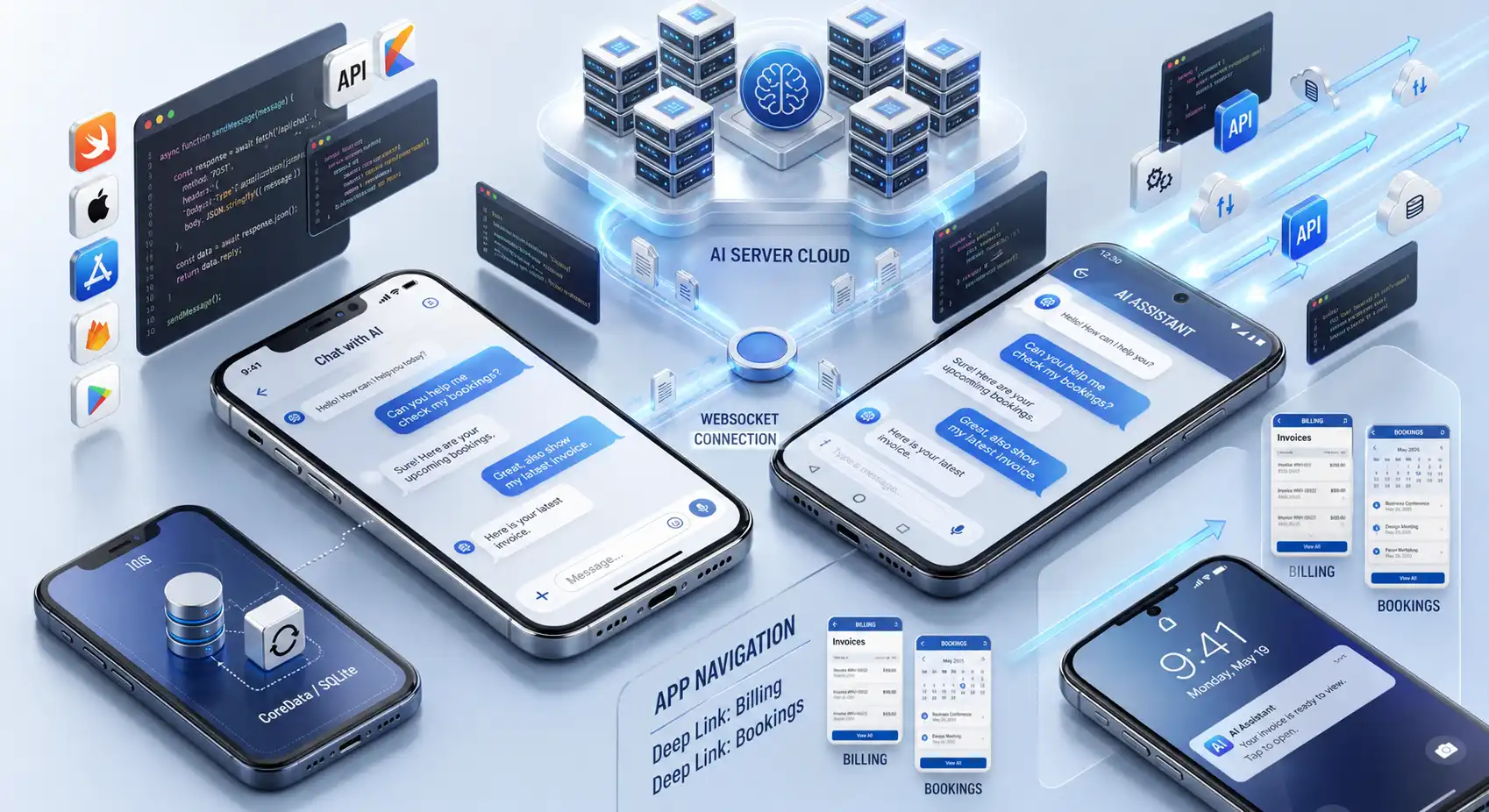
Whether your mobile app is built natively (Swift for iOS, Kotlin for Android) or cross-platform (React Native, Flutter), the architectural flow remains the same: The UI is rendered 100% natively by the phone, while the “Brain” of the chatbot remains on the cloud server.
Real-Time Communication (WebSockets vs. Polling)
Because AI models (like GPT-4 or Claude) take several seconds to generate a response, standard HTTP REST requests often time out. Mobile engineers must establish a persistent WebSocket connection between the mobile app and the AI inference server.
- The Workflow: When the user types a question, the text is sent via the WebSocket. As the cloud AI generates the response token-by-token (word-by-word), the WebSocket streams the text back to the mobile UI in real-time.
- This provides the “typing indicator” effect and ensures the mobile app feels lightning-fast, masking the backend latency.
Local Data Caching (SQLite / CoreData)
To prevent the “State Loss” problem, mobile engineers must cache the conversation history locally on the device (using CoreData for iOS or Room/SQLite for Android). If the user closes the app completely and reopens it two days later, the native code instantly retrieves the chat history from the local database and seamlessly reconnects to the WebSocket, allowing the user to pick up the conversation exactly where they left off.
This seamless, asynchronous communication is the exact same underlying logic required when automating bookings for travel and real estate mobile apps.
Chapter 3: Deep Linking and Actionable UI
A mobile chatbot should not just be a text generator; it should act as a navigator for your mobile application.
If a user asks the chatbot, “Can you show me my billing history?”, the AI should not just reply with a text summary. It should generate a native Deep Link.
Executing Deep Links within the Chat
When the AI chatbot generates the response regarding the billing history, it embeds a secure, programmatic deep link. When the user taps the link inside the chat UI, the mobile application’s routing engine intercepts it and instantly navigates the user directly to the native “Billing Settings” screen within the app.
This creates a fluid, frictionless user experience where the chatbot acts as a highly intelligent search bar and navigator for complex mobile interfaces.
Chapter 4: Proactive Engagement via Push Notifications
On a website, if a user closes the browser tab, the chatbot cannot easily reach them again. In a mobile application, you have direct access to the user’s home screen via Push Notifications.
A native AI chatbot integration allows you to transition from reactive support to proactive engagement.
The Asynchronous Push Workflow
If a user asks a complex question that requires the AI to query multiple backend ERP systems (or requires a Human-Agent Handoff), the mobile app does not force the user to stare at a loading screen.
- The UI tells the user: “I am calculating that for you now. You can close the app, and I will notify you when it is ready.”
- The user backgrounds the app.
- Two minutes later, the backend finishes generating the response. The server triggers Apple Push Notification service (APNs) or Firebase Cloud Messaging (FCM).
- The user receives a notification on their lock screen: “Your customized travel itinerary is ready!” Tapping the notification deep-links them straight back into the live chat interface.
This asynchronous architecture respects the user’s time and drastically increases app retention and daily active usage (DAU).
Chapter 5: Voice-to-Text and Accessibility (ASR)
Mobile users hate typing long paragraphs on tiny keyboards. The most advanced mobile AI chatbots integrate Automatic Speech Recognition (ASR) directly into the chat UI.
Instead of typing, the user holds down a microphone icon and speaks naturally. The mobile app utilizes native OS voice-to-text APIs (or connects to an advanced Whisper model via the backend) to transcribe the audio into text in real-time, feeding it instantly to the NLP engine.
This voice-first approach simulates human interaction and makes the application vastly more accessible, setting your product apart from outdated, text-only competitors.
Chapter 6: Avoiding the SaaS SDK Trap
Many mobile developers attempt to save time by installing pre-built, drop-in SDKs provided by cheap SaaS chatbot platforms. While these SDKs install quickly, they introduce massive technical debt.
Generic SaaS SDKs often bloat the mobile app’s bundle size by injecting unnecessary third-party tracking code. Worse, they offer very limited UI customization, meaning the chat screen will never truly match the design language of your bespoke application.
To maintain strict control over your app’s performance, UI/UX, and data security, elite development teams strongly prefer building custom AI chatbot development services over pre-built platforms.
Build Native Mobile AI Experiences with MindRind
Integrating an AI chatbot into a mobile application is a rigorous synthesis of UI/UX design, asynchronous mobile routing, and complex backend WebSocket engineering. If executed poorly, it will drain your users’ batteries and destroy your app store ratings.
At MindRind, we are a premier ai chatbot app development services provider. We do not use lazy web-views or bloated third-party SDKs. Our mobile architects (experts in Swift, Kotlin, and React Native) build ultra-lightweight, 100% native conversational interfaces. We connect these interfaces to secure, scalable AI backends, ensuring your mobile chatbot operates with zero latency, flawless memory caching, and seamless push notification integration.
Don’t compromise your mobile app’s user experience. Contact MindRind today to integrate a native, high-performance conversational AI into your iOS or Android application.
Frequently Asked Questions
A web-view simply loads a website’s chat widget inside a hidden browser within the app. It is slow, feels clunky, and loses chat history if the app is minimized. A native chatbot is built using the phone’s native code (Swift or Kotlin). It is lightning-fast, matches the app’s design perfectly, and caches data locally for a seamless experience.
Because AI generation takes a few seconds, standard HTTP requests often time out. Mobile engineers use WebSockets to establish a persistent, two-way connection. This allows the cloud server to stream the AI’s response text word-by-word back to the mobile app in real-time, eliminating perceived latency.
Not if it is architected correctly. If the AI model runs in the cloud, the mobile app is only doing minimal work (sending text and receiving text), which uses virtually zero battery. However, if a developer uses a poorly optimized “web-view,” it can cause severe battery drain and overheating.
Mobile developers use local databases (like CoreData for iOS or SQLite/Room for Android) to cache the conversation. If the user closes the app, the chat history is saved locally. When they reopen the app, the history loads instantly without needing to fetch it from the cloud again.
A deep link is a programmatic shortcut. If the AI chatbot generates a response about a user’s account settings, it can provide a clickable button in the chat. When the user taps it, the deep link instantly routes the user out of the chat screen and directly into the specific “Account Settings” page within the mobile app.
Yes. If a user asks a complex question and backgrounds the app, the chatbot’s backend server can process the answer and trigger Apple Push Notification service (APNs) or Firebase Cloud Messaging (FCM). The user gets a lock-screen notification when their answer is ready.
No, it is highly recommended. Mobile engineers can leverage the smartphone’s native Automatic Speech Recognition (ASR) APIs. When the user taps a microphone icon, the OS translates their spoken words into text instantly, which is then fed into the chatbot’s Natural Language Processing (NLP) engine.
Pre-built SaaS SDKs (like Intercom or Drift) are generic. They significantly increase your app’s download size (bloat), offer limited UI customization, and force your user’s data to travel through third-party servers. Custom native integration ensures maximum performance, strict data privacy, and a UI that perfectly matches your app.